For restaurants in tourist towns
Your menu, in every language your guests speak.
Photograph your menu. In two minutes you get it back translated, with the 14 EU allergens marked on every dish and a QR code to the web version. One payment of €19.90 — no subscription.
- Reading the menu and checking the dishes is free. You pay only to download.
- You confirm the allergens: we never guess them for you.
- Dish names stay as printed — your waiters still recognise what a guest is pointing at.
Drop your menu here
JPG, PNG or PDF · up to 8 MB · one page or several
Takes about 10 seconds. No account needed.
From the menu on your table to every language your guests speak
Everything below is one real menu going through the actual product: the printed card, its allergens, and the PDF and QR code that come out of it.
- 01
Photograph your menu
A photo, a PDF or the plain text. Any language, one page or several. Nothing to install, no account.
Trattoria del Vicolo
Cucina italiana
Antipasti
Bruschetta al pomodoro5.50
Burrata con acciughe del Cantabrico11.00
Vitello tonnato12.00
Primi
Cacio e pepe13.00
Tagliatelle al ragù14.00
Risotto ai funghi porcini15.00
…
- 02
Check it and tick the allergens
Your dishes come back in a grid. Fix anything the camera got wrong and mark the 14 EU allergens. This part is free.
Dish
Allergens
Bruschetta al pomodoro
Pane tostato, pomodoro, basilico, aglio
1Burrata con acciughe del Cantabrico
Burrata pugliese, acciughe, olio extravergine
74Vitello tonnato
Girello di vitello, salsa tonnata, capperi
43Cacio e pepe
Tonnarelli freschi, pecorino romano, pepe nero
137
You tick them. We never mark an allergen for you.
- 03
Print it, and hang the QR code
A print-ready A4 PDF, one page per language, and a QR code that opens the same menu on your guests' phones.
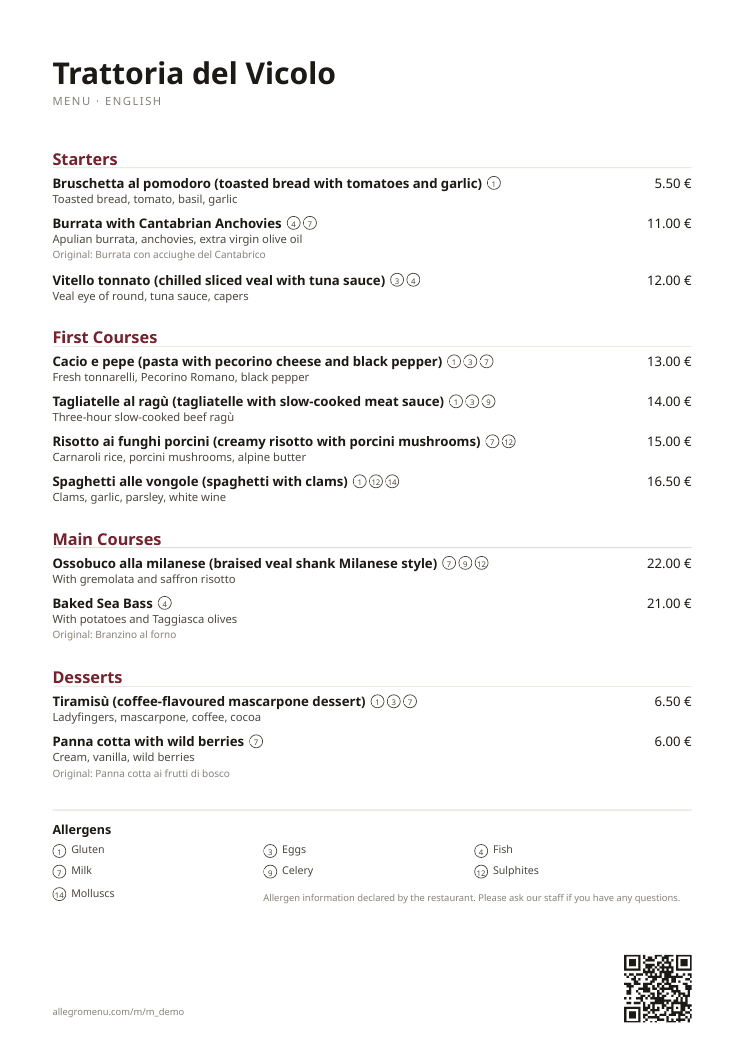
What you get: a sheet to print, and a code to hang.
Everything on this page is the sample menu of an invented trattoria, produced by AllegroMenu. Scan the code with your phone and you will be reading it in a second.
On the table
A menu you send straight to the printer
A4, one page per language, with the allergen numbers next to every dish and a legend translated underneath. Send it to the printer as it is.
On your guests' phones
A menu you can change without reprinting
The same menu, in English · Deutsch · Français, that your guests open by pointing their camera at the code. Live for 30 days with the one-time purchase.
A real code. Point your camera at it and the menu opens — the same one your guests would see.
10 languages available · 3 included
The part inspectors ask about
A menu that does not declare its allergens is the cheapest fine to avoid.
EU Regulation 1169/2011 makes the 14 allergens compulsory information wherever food is served — written down, not left to whoever happens to be on shift. Enforcement is national: in Spain, serving without that information on record is a grave infraction under Ley 17/2011.
- Minor
- up to €5,000
- Formal gaps: unreadable signage, paperwork nobody can find
- Serious
- €5,001–20,000
- No allergen information at all, or out of date after a menu change
- Very serious
- from €20,001
- An allergic guest is actually harmed
And an inspection rarely finds one thing. In March 2026 a restaurant near Rome was fined more than €20,000 in a single visit: a menu with no allergen information was one of the findings, alongside staff who had not been declared. Whatever the paperwork you are behind on, the menu is the cheapest part to put right.
Ley 17/2011, art. 51 (Spain); the Rome-area case was reported in the local press in March 2026 and the penalty was not itemised. Other member states set their own amounts — the obligation itself is the same across the EU. This is information, not legal advice.
And the guests you never see
A table with one allergic guest usually decides together. When the menu cannot answer the question, the safe move is the restaurant next door — and you never find out it happened, because nobody complains about a meal they did not have.
A menu that answers it in writing, in the language they read, turns that table into a booking.
The 14 you have to declare
- 1Gluten
- 2Crustaceans
- 3Eggs
- 4Fish
- 5Peanuts
- 6Soy
- 7Milk
- 8Nuts
- 9Celery
- 10Mustard
- 11Sesame
- 12Sulphites
- 13Lupin
- 14Molluscs
AllegroMenu marks them on every dish and prints the legend in each language. You confirm every one — we never tick an allergen for you.
Pay once. No subscription required.
One payment for the menu you need today. Keep the QR code alive for a year only if you want to — never a monthly bill.
One menu · pay once
€19.90
One-time payment, no subscription
- Print-ready PDF in up to 3 languages
- +€2.00 per extra language (10 available)
- All 14 EU allergens marked, with a legend in every language
- Web menu with QR code, live for 30 days
Menu Live · optional add-on
€119.00 /year
Works out at €9.92 a month, billed once a year
- Web menu and QR code always on, not just 30 days
- Unlimited edits: prices, seasonal dishes, new sections
- Unlimited re-translations, all 10 languages included
- New PDFs whenever you change something
What a year actually costs
- AllegroMenu — just the menu and its PDF€19.90
- AllegroMenu — with Menu Live all year€138.90
- A subscription at €15.00 a month€180.00
- A subscription at €29.00 a month€348.00
- A subscription at €49.00 a month€588.00
Plain arithmetic, not a claim about anyone's prices — put the quote you have been given next to it.
Menu Live is an add-on to a menu you have already bought; it is not sold on its own. Prices include VAT where applicable. Cancel at any time — your web menu stays up until the end of the year you paid for.
Questions restaurants ask us
How much does a translated menu cost?
€19.90, paid once, for one menu with up to 3 languages, plus €2.00 for each extra language. There is no monthly fee: reading your menu and checking the dishes is free, and you only pay when you download the PDF.
Do I need a subscription?
No. The €19.90 payment is a one-time purchase and the PDF is yours to keep and print. Menu Live is an optional add-on at €119.00 per year (about €9.92 a month) if you want the web menu behind your QR code to stay online and editable after the first 30 days.
How long does it take?
About two minutes. You photograph the menu, we lay the dishes out in a grid for you to check, you tick the allergens, choose the languages and download the PDF.
Which languages can I get?
10: English, German, French, Italian, Spanish, Portuguese, Dutch, Greek, Russian and Chinese. Three are included in the €19.90 price and the rest are €2.00 each. Dish names stay as printed, with a short explanation underneath, so your staff still recognise what a guest is pointing at.
Who is responsible for the allergen information?
You are, as the food business operator, under EU Regulation 1169/2011. AllegroMenu shows a grid with the 14 EU allergens and may suggest the ones that are obvious from the text of a dish, but nothing is marked on your menu until you confirm it. We never guess allergens for you.
What if the photo is not read correctly?
You fix it before paying. The dishes come back in an editable grid with names, descriptions and prices, so you can correct anything the camera got wrong. Reading and correcting the menu is free — you only pay to download.
Can I change the menu after I download it?
Yes. Your web menu and QR code stay live for 30 days with the one-time purchase, and you can edit dishes and prices during that time. With Menu Live the same QR code keeps working year-round, with unlimited edits, re-translations and new PDFs.
Do I need to create an account?
No. You upload the menu, work on it and download it in the same session — there is nothing to sign up for. Keep the link you land on: it is how you get back to your menu.